
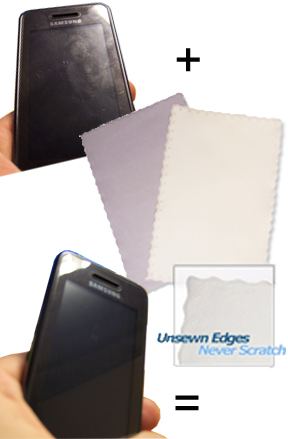
With the growing popularity of touch screen devices, more and more people are using them every day. Whether you have an iPhone, iPod touch, one of those new Samsung or Motorola touch phones, or some other similar pda, mp3 player or phone, chances are it gets really dirty just like everyone else’s. Fingerprints and grime build up on these devices quickly, leaving users to wonder what the best method is for cleaning.
Although it’s a pretty simple process, there are several things you’ll want to avoid to make sure your phone is both clean and in working condition when you finish. Because these devices are so unique, and their screens are so sensitive to touch, many people don’t know the best way to clean them without damage. In this situation, less is more, and a very simple tool will give you the best possible results.
We recommend a microfiber cloth as the safest, quickest and easiest way to clean any touchscreen device, but we also recommend that you make sure it is a good one in order to avoid frustration and lack luster results. Our high quality cloths would be ideal, but any other version of equal ability would be a good choice as well. The problem is that there are more cheap versions that good ones, and pictures on the internet don’t really make it easy to tell the difference. Even up close in local stores, the crappy cloths look strikingly similar to the good ones, but as with anything, the proof is in the outcome.
Better Material = Cleaner Screen
Our microfiber phone cloth is the perfect size at just 6″ x 7″, and it features a super fine microfiber suede finish that is guaranteed to never scratch any surface you use it on. It also has thermally welded edges so there are no sewn hems or other similar areas to scratch the surface you are using it on. A dry cloth is all you will need for most situations. The high quality material will deep clean any sensitive area in just seconds. Fingerprints, smudges and other grime will be easily wiped away with just the cloth alone. Other versions are lighter, thinner and more slippery, and most made for small devices have no ability to absorb the most common dirt you find.
Oily smudges cause the cloudy haze that makes most of us wipe our phones to clear the screen, but low quality material will spread and smear instead of lifting and eliminating. Sure you can eventually get your phone pretty clean, but who wants to work that hard? Superior fabric eliminates the hassle that the flimsy impostors force upon you because a single swipe can completely clean the surface no matter how greasy it is. The fabric is what does the work, so a higher grade fiber will lead to an easier process, and much better results.
If your screen is caked with gunk, you might have to get the cloth damp, but because you need so little moisture to make a difference, you aren’t really increasing risk at all. When water is added, it acts like a mild detergent to help free stubborn grime and make it slide off the surface as it becomes locked into the fibers. Simply wet it under the faucet, and then wring it out until it ‘s just barely damp. This will give it the extra power it needs to cut through the toughest build-up. Thanks to design and fabric type, it will never scratch any surface, it will never leave behind annoying lint, and it will clean better than inferior knock offs, expensive sprays or fancy, brand specific itools.
Like your cloths big? Want to fold one up to make a nice fluffy pad? We think a phone cleaning cloth should be a certain size, but we also realize that everyone has different preferences, so we have several size options in identical or similar materials. If you are looking for an option that’s a bit larger, wealso carry a 5 x 8 cloth, 8 x 8 cloth, 9 x 10.25 Cloth, 12 x 8.5 Cloth,12 x 12 cloth, or a 16 x 16 cloth with the same micro suede finish, or one that is similar.
What To Avoid
When cleaning your phone, you don’t ever want to spray any liquid directly onto the device, and avoiding cleansers all together can be the safest method of all. Because these are electronic devices, liquid is not friendly to their inner workings. It’s also recommended that you don’t use Windex, or any cleaner that contains alcohol or ammonia. These common spray cleaner ingredients can harm the touchscreen surface. They can also cause damage to commonly used screen protectors, so you will be doing yourself a favor if you just avoid them all together. Another thing to look out for is that the power is turned off on your device. This is always the safest way to go, to minimize the possibility of damage occurring. Also the safest detergent to use is water, but too much can be just as bad as using something different. When applying water to your cloth, make sure to use just a little. Too much moisture can cause damage to your phone that could be permanent. If the cloth is dripping or the surface shows water spots after wiping, then you are using too much water.
Cleaning Instructions:
Your iPhone’s screen is the single most important part of the device. Not only is it the window you view the interface through, it IS the interface. The following are recommended steps for cleaning your phone:
- Get your microfiber cloth.
- Turn off your device – When using the cloth dry, a hold setting is all that is necessary, you don’t actually have to turn it off.
- If necessary, dampen the material. (for regular cleanings, a dry cloth is usually sufficient. For stubborn build-up, or for periodic deep cleanings, get it wet under the faucet and then wring out until it is just damp.)
- Wipe the screen gently with your cloth, making sure to avoid getting any moisture into the jacks or ports. You can also wipe down every other surface to remove dirt and grime all over, not just the glass. This method is safe for plastic, metal, rubber and more, so use it for all sides, and even on protectors and cases.
- Wipe from top to bottom, left to right, or inside to outside to ensure even coverage. Either a back and forth motion or a circular motion can be used.
- Use all the way unfolded to clean more surface area in less time, or fold in half or quarters to make it last longer between cleanings. Simply unfold and refold to reveal a clean layer.
- Allow your device to completely dry after you are done cleaning. This should only take a few seconds unless you have used too much water.
- Turn your device back on, and get back to using a touchscreen that you can actually see.
Bottom Line
A damp microfiber cloth will remove all of the dirt and grime, as well as fingerprints and other stubborn build-up, but most times you will only need to use it dry. This makes it incredibly quick and convenient, because you can just whip it out and take care of the mess without getting up to grab an additional spray or something else costly and annoying. When you use our cloth, a bone dry approach will quickly eliminate most grime within a matter of seconds, so it’s easily 0ne of the quickest, easiest and safest ways to remove dirt and fingerprints from any touch screen phone. The advanced weave of our high quality cloths allow them to remove 99% of all dirt, germs and bacteria from almost any surface, so they are perfect for small electronic devices that are sensitive to chemicals and moisture. You can wash each one hundreds of times due to commercial grade durability, and most people will go months before it gets dirty enough to warrant it. For this reason, a single, affordable purchase could solve your dirty screen problems for the life of your device.
Things To Think About
It’s important to note that all cloths are not created equal. We can guarantee results with the ones that we carry because we know they are made from the highest quality material. If you try to save a few nickels by getting one somewhere else, chances are you will be pretty disappointed. Most similar looking tools will get the surface clean if you try hard enough, but struggling and straining should not be necessary just to have a useable cell. Superior material allows for oil absorption, and stubborn grime removal without scraping, while cheaper, more slippery material leads to smearing and sliding.
That free cloth that came with your device just glides over stuck on grime, and spreads out greasy build up. The ones we carry absorb the greasy stuff, and power through the stubborn stuff, and as you wipe, everything is lifted up and away from the surface to be held by the teeny fibers of the material. Despite being highly affordable, they will also provide outstanding results, and basically last forever. Get the size and material that we recommend for phones, or browse the other sizes available as they are all similar materials, and completely safe for this job.
Tip Contents
- Better material for a cleaner phone.
- What to avoid.
- Step by step cleaning instructions.
- Bottom Line
- Things to think about.
 Submit A Tip
 Ask A Question

 Ordering Info
 Customer Service
 Follow Us
 Search For Stuff
 Find Us
 Call Us
 Pay Us

Thanks for this posting. All of us have touch screen gadget that needs to be maintain clean. Very informative and useful
I really enjoyed reading about How To Clean Your iPhone or Other Touch Screen Phone and thought it was well worth the read. The only other site I found on Bing wasnt as good as this one, thanks.
Who uses Bing these days. Most people use google. How about a way to clean it without buying your stupid cloth.
Agreed. Most people do use google, but we are not sure what that has to do with cleaning a phone. If you are looking for a way to clean your phone without purchasing our stupid (read awesome) cloth, may we suggest the hot breath and back of a t-shirt method. We find this perfect for folks who refuse to make their lives easier by purchasing a fantastic solution that makes the job quick and easy. After all it is a huge investment to drop less than $3 including shipping on a cloth that cleans amazingly and can be washed and reused hundreds of times. Just sayin…
You can buy them anywhere…
Yep. These types of cloths are getting easier to find, but that is because the market is being flooded with cheap imitations and alternatives. You can find good ones if you try, but all microfiber is not created equal. In order to have results that are quick and easy to achieve, you need a good cloth. High quality microfiber cloths like the ones we carry will clean better, last longer and be easier to use than others.
I absolutely love your stupid (read awesome) cloth for cleaning my iPhone, and my eyeglasses, and all other delicate items that can be easily scratched – I have a collection of different sizes and wash them separately in a lingerie bag. Great post!
Thanks for the comment. It is always nice to hear from actual users out there. These little guys are phenomenal at removing gunk from delicate screens, and it is always nice to have some real reviews mixed in to balance out the more cyniclal folks among us.
cleaning Iphone is disgusting. screen gets scratches if you don’t take precautions. but this blog provides good tips. sure these will be helpful
Thank you for the tips. I just got a new Samsung Galaxy and I’ve already cleaned it twice with electronic screen cleaning wipes that contain alcohol!! I assumed they were safe, but after reading this I will not use them again. Thanks!
Yep. Safer=better. These cloths are a no-brainer. They work great and you do not run any risk of damage.
Googled a way to clean my phone and was brought here only to find a commercial. But thanks for the info…you can buy a microfiber cloth anywhere…try the dollar store…same thing at a fraction of the cost!
You are most welcome for the info. A microfiber cloth is the best way, and you can certainly find cheap ones everywhere now-a-days. The problem is that, like with everything else, you get what you pay for. Many electronic and phone manufacturers will actually include free cloths with your purchase, but those ones, and the cheap ones at Walmart and the dollar store won’t clean as well, and definitely won’t last as long. If you take a look at any of those low cost wipes, you will notice they have an almost nylon look and feel to them. This cheap and lightweight fabric will do a mediocre job at cleaning your screen because it is only able to sort of wipe, and not really clean or absorb. This means that you will mostly just be kind of smearing the crud around until the screen looks useable. Our cloths are probably 5 times the weight, and have a totally different look and feel to them. That is because they are totally different, and work way better because of it. The thick, high quality material that makes up our cloths packs more cleaning power, and is much more able to absorb dirt, oils and residues. We know…What do you care, right? A cloth is a cloth. Well… for just pennies more in most cases, you could have our cloth, and each time you clean your phone, it would take you less time, and you would have better results. This means that you would be cleaning it less frequently in the first place, spending less time wiping to get it clean, and having a fingerprint-free phone more often. This will result in less people looking at you sideways because you carry such a grimey phone, or making fun of you because you seem obsessed with wiping it all the time. You will also gain the benefit of having a cloth that will last years longer than your special dollar store cheap-o version, but by all means, please do as you wish. Don’t listen to our “commercial” and go out of your way to save some pocket change while making things less clean and more difficult on yourself. It’s worth it.
Feel free to send us a private email John, and include your shipping address. We would be happy to send you a cloth, free of charge, just to prove to you how great and different from your run of the mill screen wipe they are.
Definitely make sure your cloth is microfiber, a normal cloth is for noobs
Very true. But don’t get duped by those freebee, included with purchase microfiber cloths either. You know, the ones that feel like a pair of nylons and are thin and slippery. Those ones are microfiber cloths, but certainly don’t deliver the same level of cleaning power, and definitely won’t last like the ones mentioned here. It is more than just using microfiber, it is all about getting a high quality cloth if you want to make cleaning easy and get a cloth that will last for years.
i used a microfiber cloth and a liquid-like cleaners that comes together, which i used to wipe my laptop glass screen , to wipe my phone galaxy s2’s screen ( with screen protector ). And after that i was shocked to see green and purplish patches under the light on my screen when it is in the stand-by mode. What has happened to it? Have i damaged my phone ? or just the screen protector ? I am so worried now as i just bought it not long ago!
Ouch! This is why anything liquid is just too risky. You don’t need it, and electronics and moisture have never gotten along well with each other. It sounds like you may be lucky in this case though. All of those colored spots are probably moisture stuck under the screen protector. You can easily get rid of them by removing the protector and wiping away the wetness. Unfortunately, most screen protectors will be rendered useless once removed, but the moisture has to be dried if it is under there. If you leave it stuck under the plastic and on top of your screen, it will probably cause some damage. Once you get this situation fixed, try a better microfiber cloth. If you get the right tool, extra sprays and liquid cleaners will sound silly and unnecessary. Original and high quality microfiber is designed to work with nothing or just water as a detergent. Any cloth sold with a bottle of cleaner as an accessory is probably compensating for low quality material.
Honestly just get a cloth that come with a standard glasses (spectacle) cleaning kit, they usuayll also come with a liquid, all for like 2 dollars in your nearest supermarket. Both the liquid (use a small amount) and the spectacle cleaning cloth are brilliant for phone screens!
Sure. That could work. Problem is, most cleaning kits that include spray do so to compensate for a less than impressive cloth. Most people wouldn’t spray a liquid onto their phone if you paid them, and it is just not necessary, so why take the risk. Those slippery, nylon style microfiber cloths can’t remove fingerprints and oily residue like a good one can, so they toss in some spray to finish the job. It is not expensive to get a good cloth, so why not choose the right tool the first time, and eliminate the guess work, or possible damage.
What’s the difference between your fiber cloth & touch screen wipes I’ve seen? I’m researching for my mom.
Glad you asked. It sounds like you’re talking about one time use cloths that come in a package like mini baby wipes. These are not reusable, so the cost is much much higher overall, and they are moist so that may pose a risk. You will not get the screen any cleaner with these and it may actually take you longer to do the job. Our high quality cloths are pretty much fool-proof. The main grime encountered is greasy fingerprints, and the thick, soft material cuts right through them even when used dry. Many “experts” might be recommending disposable wipes, but that is most likely because they will be benefiting from the fact that you will need to reorder quickly. Cha-Ching. Choose our low cost options instead to have a cleaning tool that will perform better than almost anything else, and also last for longer than your phone remains in use.
These micro fiber cloths are not lifting the grime. Cloths are smearing grime all over the face plate. Just take your iphone ipad out doors in the sun and turn it off. Look at that film all over your phone ipad. There has to be a way to CLEAN the screen!!!!
Thank you and yes. That is exactly the point. Most people are using “micro fiber” cloths that seem to work fine, but are not actually doing the job. This is why they were free. You wipe and wipe, and eventually the dirt smears to a point of better visibility, but the glass is not actually clean. Our higher quality cloths are made from a better material that is quite different in weight, feel, appearance and certainly functionality. Instead of spreading the grime around, they actually absorb the oils and lift up the dirt. Everything gets picked up and locked in as you wipe, so when finished, the screen will be incredibly clean, even outside in the sun. Try for yourself and you won’t be disappointed.
Read this article after i had cleaned my touch screen with a cleaning gel now can’t use the touch screen. Any ideas on how to fix this?
Ouch. Sorry to hear this. Hopefully you have insurance, because it may be broken for good. Moisture has probably worked it’s way into the cracks and under the glass. You may get lucky with renewed functionality once it dries, but it’s more likely that the damage is permanent.
Today, while I was at work, my sister stole my apple ipad and tested to see
if it can survive a 25 foot drop, just so she can
be a youtube sensation. My iPad is now broken and she has 83 views.
I know this is completely off topic but I had to share it with someone!
Oh no. Thanks for sharing. That really stinks. Did you mean to say former sister?
Very informative article, I didn’t know that you shouldn’t use chemicals on a touch screen. Usually when my phone is dirty, that’s what I use. Maybe that’s why my phone is slower. I’ll try out your tips and see how they work, because like you said touch screens tend to get really dirty.
LOL. Your slow phone is probably related to all the crappy free apps you downloaded, not how you clean it. Chemical sprays are certainly a bad choice, and could brick your device, but bloated applications are more likely to cause performance problems. Please, do yourself a favor, and toss the spray so you can use one of our high quality cloths instead.
I am talking about a new samsung galaxy 7 phone, sticky residure left from a stupid sticker I put on the back > Help!!
I’ve been using iCloths (iCloth – Select a wipe size for your device) or (Amazon.com: iCloth) for several years now. They are the perfect phone screen cleaner, hands down!! I’ve tried other products from dry cloths, to alcohol rubs, to my t-shirt, nothing else comes close to clearing so thoroughly.